4/11/12

Releasing Platinum Blogger Template

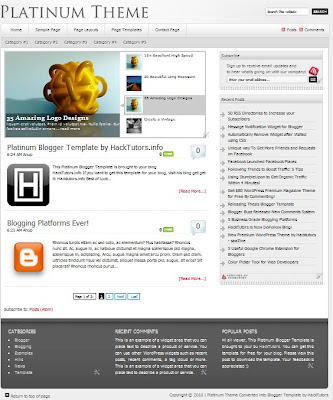
Once again I'm back with one new magazine style Blogger Template named "Platinum". It look very professional and definitely suits on your blog. Platinum Blogger Template has many features that are most demanded by Blogger users. Thesis Blogger Template is also the greatest template that I've made. I guess you'll love it after viewing the Demo.
Download Platinum Blogger Template

View Demo

Download Platinum Blogger Template

3828 Times Downloaded

I converted Platinum WordPress theme into Blogger Template. Originally, Brian Gardner designed it and I converted it for all Blogger users and make it available for absolutely free. 

Let see what I have added the cool feature on this template:

JQuery Drop Down Menu Bar


On the top of the page, it consists of awesome Drop down menu with JQuery effects. When you hover your mouse to these menus, it will drop soothly to downward direction.

JQuery Featured Post widget


With this widget, you can show the most featured post of your blog with image thumbnail and summary text. However, featured post widget is only visible on HomePage to make it look more professional. 

Automatic Read More with Thumbnail


After you've written a post, you don't need to worry about the Jump links that blogger recently announced. Just you have to create a post a publish it! Your reader can easily view your post with attractive thumbnail on the left side and Ream More link on the right side.

Page Navigation


There was an error on the Blogger's default pager links. So, I installed Page Navigation hack for it to make it easy to turn the page of your blog easily.

There is many more missing that I cannot mention it here. In fact this template have more flexible where you can add more widgets on the right sidebar and there widget on the footer.

Customizations

Now, let's do some customization to fit it on your blog.

Top Menu Configuration

Find the following code on your template and replace URL(s) with your own.

<div id='nav'>
<ul class='nav superfish'>
<li class='home'><a class='home-link' expr:href='data:blog.homepageUrl'>Home</a></li>
<li class='page_item page-item-70'><a href='#'>Sample Page</a>
  <ul class='children'>
    <li class='page_item page-item-17'><a href='#'>Sub Page 1.1</a>
      <ul class='children'>
        <li class='page_item page-item-25'><a href='#'>Sub Page 2.1</a>
          <ul class='children'>
            <li class='page_item page-item-31'><a href='#'>Sub Page 3.1</a></li>
            <li class='page_item page-item-33'><a href='#'>Sub Page 3.2</a></li>
          </ul>
        </li>
        <li class='page_item page-item-27'><a href='#'>Sub Page 2.2</a></li>
        <li class='page_item page-item-29'><a href='#'>Sub Page 2.3</a></li>
      </ul>
    </li>
    <li class='page_item page-item-375'><a href='#' title='Page Layouts'>Page Layouts</a>
      <ul class='children'>
        <li class='page_item page-item-377'><a href='#'>Content/Sidebar</a></li>
        <li class='page_item page-item-379'><a href='#'>Sidebar/Content</a></li>
        <li class='page_item page-item-387'><a href='#'>Full Width Content</a></li>
      </ul>
    </li>
    <li class='page_item page-item-62'><a href='#'>Page Templates</a>
      <ul class='children'>
        <li class='page_item page-item-112'><a href='#'>Archive Page</a></li>
        <li class='page_item page-item-227'><a href='#'>Blog Page</a></li>
      </ul>
    </li>
    <li class='page_item page-item-213'><a href='#'>Contact Page</a></li>
    <li class='right rss'><a href='#'>Posts</a><a href='#'>Comments</a></li>
  </ul></div>
</div>
<div id='subnav'>
  <div class='wrap'>
    <ul class='nav superfish'>
      <li class='cat-item cat-item-4'><a href='#'>Category #1</a></li>
      <li class='cat-item cat-item-5'><a href='#'>Category #2</a></li>
    </ul></div></div></div>

Remove # and place your URL.

Featured Post

Go to Design > Page Element. You'll found the widget on the top named "Featured Post". Edit that widget and replace all URL and text with your own.

Note: You can remove that widget if it doesn't fits on your blog.

Logo

To change your own logo find the following code on your template and replace the image URL with your own logo URL,

  <h1 id='title'><a expr:href='data:blog.homepageUrl'><img src='http://4.bp.blogspot.com/_b0xJ7qk6DTc/
THvRqkecH1I/AAAAAAAAA64/EgNa1OjtlQQ/s1600/logo.png
'/></a></h1>

Now finally, you are ready to use Platinum Blogger Template to your blog. If you have any problem regarding this template feel free to ask. You feedback is highly appreciated. You can share your opinion about this new wordpress converted Blogger Template. I hope you like this template.

We'll create more Blogger Template like this. Subscribe to this blog to get more awesome template direct to your inbox.

Releasing Flash News Blogger Template

nce again, I'm back with the new Blogger Template named Flash News. Flash News Blogger Template have 2 columns with the clean layouts and professional design. Flash News Blogger Template suits on any blog. It loads faster with comparison to other web templates. I made Flash News Blogger Template available for freefor all blogger users!

View Live Demo


2874 Times Downloaded

Main Features
Flash News Blogger Template has all the features that has been taken out through the official Blogger and Blogger resources. I converted it into Blogger Template, originally it is WordPress theme designed by WooThemes.

Stylish Menu Bar
JQuery Menu Bar

Th top Menu Bar is based on JQuery which is professional designed and with special hover effects.

Featured Post Widget

The Flash News Blogger Template contains featured post widget which is entirely different from other.

Automatic ReadMore with Image Thumbnails

Automatic read more makes easy to all of your viewers to view your post in summary with relevant image. Continue Reading link contains on the left side and the labels contains on the right side of the post .

Page Navigation

Instead of Older Post, Newer Post link there is a navigation which makes easy to scroll and jump within the page to page.

3 Footer Widgets

You can place the three or more widgets on the footer. So, you can have a maximum widget on this template.

Configurations
Lets fit it on your blog! Flash News is very easy to use.

Top Menus Configuration
Find the following code in your template and replace the URLs with your own:

<ul class='nav1'>
       
<li><a expr:href='data:blog.homepageUrl'><span>Home</span></a></li>

<li><a href='http://www.hacktutors.info/2009/08/contact-me.html'><span>Contact Me</span></a></li>

<li><a href='http://www.hacktutors.info/p/our-in-touched-bloggers.html'><span>Blogs</span></a></li>

<li><a href='http://www.hacktutors.info/2010/08/color-picker-tool-for-web-developer.html'><span>Tools</span></a></li>

<li><a href='http://hacktutors.info/p/link-to-us.html'><span>Link to Us</span></a></li>

<li><a href='http://www.hacktutors.info/p/blog-page.html'><span>Archive</span></a></li>

         </ul>

Sub Menu Configurations
Find the following code in your template and replace with your own:

<ul id='nav'>
  <li class='cat-item cat-item-3'><a href='#'>Asides</a> </li>
  <li class='cat-item cat-item-4'><a href='#'>Category Three</a> </li>
  <li class='cat-item cat-item-5'><a href='#'>Category Two</a>
    <ul class='children'>
      <li class='cat-item cat-item-11'><a href='#'>Two Point Two</a> </li>
    </ul>
  </li>
  <li class='cat-item cat-item-6'><a href='#'>CatOne</a>
    <ul class='children'>
      <li class='cat-item cat-item-13'><a href='#'>Another SubCat</a> </li>
      <li class='cat-item cat-item-7'><a href='#'>CatOne Sub</a>
        <ul class='children'>
          <li class='cat-item cat-item-9'><a href='#'>Multi level</a> </li>
        </ul>
      </li>
      <li class='cat-item cat-item-10'><a href='#'>Subber</a> </li>
    </ul>
  </li>
  <li class='cat-item cat-item-8'><a href='#'>Featured</a> </li>
  <li class='cat-item cat-item-12'><a href='#'>Video</a> </li>
</ul>

Featured Post Widget

In default, featured post widget may not appear. To make it work go to Design > Page Element. Click Add a Gadget just between "Blog Posts" and "Header" widget as shown below:


Then click HTML / JavaScript and add the following code in the box:

<div class="box">
  <div id="arrows">
   <a id="prev2" href="#">
   <img src="https://blogger.googleusercontent.com/img/b/R29vZ2xl/AVvXsEgb5-bFjFPq3mKyK0K3K5BAx9bq7HWHYfimdYykl9cHcu74QcioPUjdKyplb5CcBy7VyBUmYgXNnrY86Jt6G5rHMjjEMIv_f5a4Y-CyF890Ibm0ut93k31cfk4qUacSbYBy2KasCxQBljZO/s1600/left-bar.gif&quot;" alt="" class="fl" /></a> <a id="next2" href="#">
   <img src="https://blogger.googleusercontent.com/img/b/R29vZ2xl/AVvXsEgjRP1xcLbBBjjYjrUmi97QM1aybaBbw8Ou8C8Kwiekou2q7yX02UA9fgvpAZN5JTworegXJ29Idh4zGeKUx5U5-k7VsCvubt8zxjDMuqe1-ne5dd0sWPPbQHYcBUfnAoauJVnCqfji4cWM/s1600/right-bar.gif" alt="" class="fr" /></a> </div>
  <!--/arrows -->

  <div class="featuredpost">
    <div class="featureditem" >
      <div class="col4">
    
       <img src="https://blogger.googleusercontent.com/img/b/R29vZ2xl/AVvXsEjjI79rhrQ_n3Wp7kEgfWDOGo7hibUnFDNjxLfzAo12iJQE8IV_ZPf1hZDt6uSIHaIfteiwZkvbkNK9LdR6GmbMbS9YU06l9MakJnOkXuo9F13A2ZxujytUb9efxxQ8z6bjjW0kEYQ3JPCD/s1600/thumb.jpg" /> </div>
    
      <div class="col5">
        <h2><a href="#">Title 1</a></h2>
        <p class="content">Title1's short summary Goes Here</p>
      
        <p class="reading"><a href="#">Continue reading...</a></p>
      </div>
      <!--/col5 -->
    
    </div>
    <div class="featureditem" style='display:none'>
      <div class="col4">
      <img src="https://blogger.googleusercontent.com/img/b/R29vZ2xl/AVvXsEiT7mKypONU0BYUr7kBlkNgC1SG98slelXlhGK5G3N53N5-9H7uRfPTP9zYYRQgcEHU1brr67oP4z5_dk5gWVRYiFNAekb4sphl9bkfr3qJ2Dy8GhPFP0a2fhzWnhEpM6YzOWoT1SxQ8JM/s400/Platinum+Blogger+Template.JPG" /> </div>
      <div class="col5">
        <h2><a href="#">Title 2</a></h2>
        <p class="content">Title2's short summary Goes Here</p>
        <p class="reading"><a href="#">Continue reading...</a></p>
        <p></p>
      </div>
      <!--/col5 -->
    
    </div>
    <div class="featureditem" style='display:none'>
      <div class="col4">
    
      <img src="https://blogger.googleusercontent.com/img/b/R29vZ2xl/AVvXsEjneA1HluLae8pWPKldnOSOX-jvkEHRhhOwNIgxlC3fl6tVvAxieAN1_iGq54X9aV6SNI0wf9LmvvwA9tDU09rzyAczL51AphXFRxxP-6OGaLgPYcTqVk-WLMKrvN2GUojJJpkR9433N6q8/s1600/thumb2.jpg" /> </div>
      <div class="col5">
        <h2><a href="#">Title 3</a></h2>
        <p class="content">Title1's short summary Goes Here</p>
        <p class="reading"><a  href="#">Continue reading...</a></p>
        <p></p>
      </div>
      <!--/col5 -->
    
    </div>
  </div>
  <!--/featuredpost -->

</div>
<!--/box -->

You can place any image size, it automatically resizes and fits on the featured post widget. Here is the instruction how to customize featured post widget:

There is 3 content in this widget, replace each Blue color URL with your own Image URL.

Replace # with the post URL.

Replace the Green color text with the title of each featured post.

And replace Pink color text with the short summary of the each featured post.

Finally, save the widget!

Now, you are ready to use Flash News Blogger Template on your blog. I hope you loved this template. Your suggestions and feedback is highly appreciated!

Feel free to ask if there is any confusing and problems. I'm always ready to help you!
by hacktutors.info

Top 3 WordPress Converted Free Blogger Templates

Now a days, there is the most demand of professional blogger template which are derived from WordPress. However, I made 3 professional blogger template which is very hot now a days.

So, today I am revising all my previous blogger template that I have made. Some of you may not have see these. Lets go with the popular one.

Thesis Blogger Template


Thesis Blogger Template is the first one that I have converted it into blogger platform. My first blogger template covered the top professional blogger template of August and its very hot! It have simply, 2 column and very good layouts.

As the inspiration if this, Platinum and Flash News was my target and already covered it! 

Platinum Blogger Template


This one is second blogger template and the most good choice of Blogger users. Platinum theme covered same feature like Thesis have but its professional design attracted users. However, it have some more great feature like JQuery menu, JQuery Slider and so on.

Flash News Blogger Template


Flash news was my last choice (but not least). I found it is very professional blogger template but HackTutors readers haven't covered too much interest on it. Its stylish header may attract your visitor.

So these are the 3 good blogger template that I have made. I will be creating more new professional blogger template in future. Your feedback is highly appreciated. Without your feedback, I'll not create any new template.
http://book4y.blogspot.com copy by hacktutors.info